
Case study 02 / Automation
n8n automations
Following through, without another manual handoff.
I use n8n to connect the project workspace with repeatable actions: notify people when a service report is uploaded, remind them about parts before a service visit, and update related records. The workflows run on infrastructure I manage.
Automation platform · Workflow design & operation
01 / The context
Understanding the whole problem.
Manual handoffs between tools can leave information disconnected. Automation requires understanding the process first: what starts it, what data it needs, and what should happen next.
02 / The approach
How the pieces fit.
Read the relevant records
Scheduled workflows query Notion for the information needed by that process.
Make the next action clear
Generate a notification or reminder from the project information, with a specific reason for the message.
Update the workspace
Write information back to Notion as part of the workflow. A related workflow looks up and updates customer-location relationships.
Select reports that still need a notification
The service-report workflow checks Notion for projects with an uploaded service or acceptance report and an unchecked email-sent field. A scheduled query feeds an email step and a Notion update, turning a report upload into a follow-up process.
Keep related records current
A separate published workflow reads Notion records and updates customer-location information. Together with the advance-reminder workflow, it shows how the same automation platform supports both communication and record maintenance.
03 / What it demonstrates
Technical work, in context.
I turned recurring operational handoffs into connected workflows: read the relevant records, prepare the next action and write updates back to the workspace. The public overview shows the sequence without exposing private configuration or business records.
Design considerations
- Keep the trigger, data source and resulting action easy to follow.
- Separate workflow configuration from the business records it processes.
- Consider failed runs and duplicate notifications when extending a workflow.
04 / Visual documentation
A closer look.
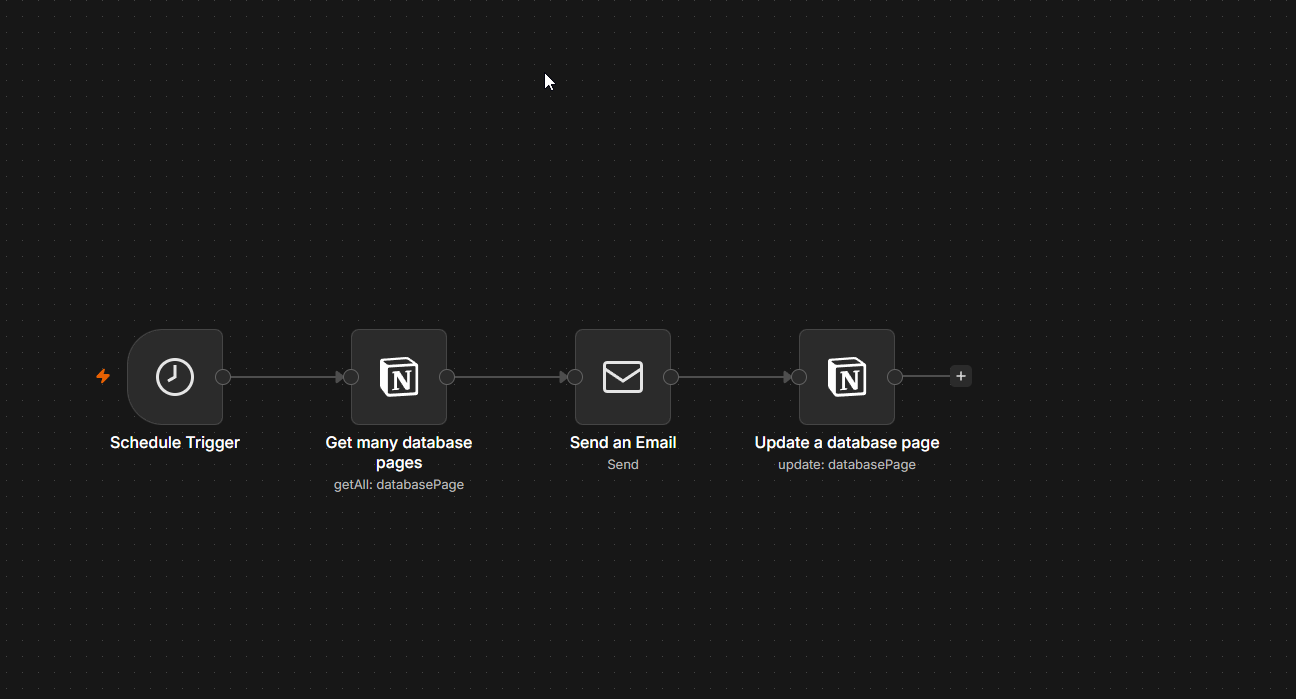
An overview of the workflow structure. Credentials, recipient details, internal addresses and payloads are not shown.